
Introduction
The cardiologist asks for last year’s ECG. Your father says it is in the blue folder. The blue folder, it turns out, sits in an almirah at his brother’s house in Surat, and his brother is away until Thursday.
Most homes don’t have a shortage of reports. They have reports in too many places.
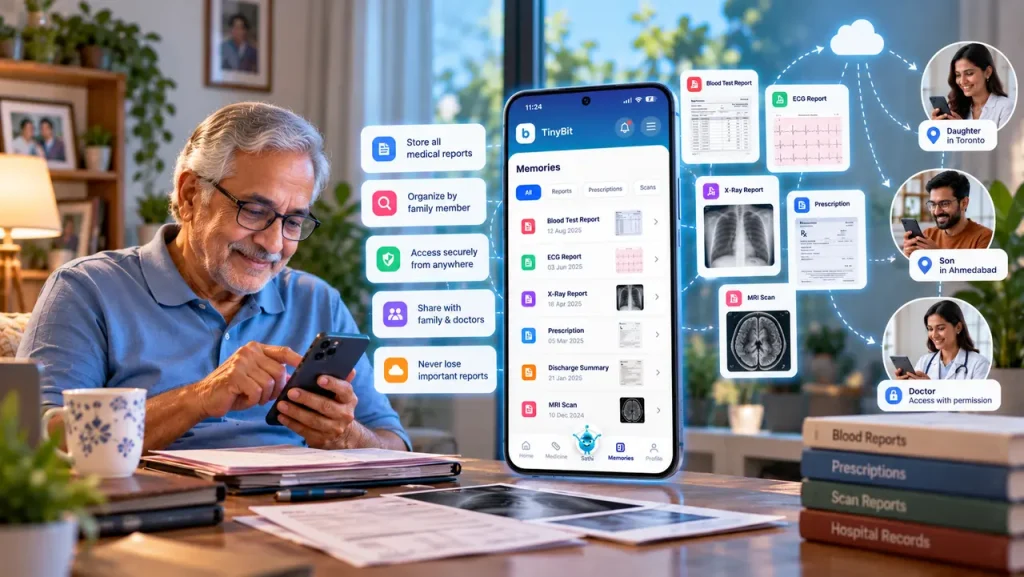
Digital medical records are your reports, prescriptions, scan results and health history stored in one secure app instead of paper files and chat threads. You upload each document once, sort it by family member, and open it from your phone whenever a doctor, lab or insurer asks. Nothing gets lost, and nobody has to search.
Where the reports actually end up
Ask a family where their medical papers are and the answer takes a while. The latest blood test is a PDF in Mummy’s email. The one before it came on WhatsApp from the lab and got buried under forwarded good-morning messages. X-ray films sit in a brown envelope on top of the wardrobe. A 2022 prescription is a photo somewhere in a gallery of three thousand pictures.
Everyone’s collection is also different. A sister abroad keeps one folder for her mother’s reports, a brother in Ahmedabad keeps another, and each is missing the other’s half.
Computers in hospitals haven’t fully fixed this. According to HealthIT.gov, the US government’s health IT office, roughly one in five people were still carrying a test result such as an X-ray or MRI to their own appointments as of 2022. By 2024, about 10% said they had to repeat a test because earlier results couldn’t be found. Even where the systems are digital, the patient often ends up as the courier.
Appointments suffer most. A useful consultation runs on dates: when the sugar went up, when the medicine changed, when the last scan happened. Families who walk in with those answers get a different visit from families scrolling through 400 photos while the doctor waits.
A medical report you cannot find in two minutes is, on the day it matters, a report you do not have.
What a digital medical record actually is
Take away the jargon and it’s your health paperwork in a form a phone can open: reports, prescriptions, scans, discharge summaries, vaccination cards. Some people call the result digital health records. Others call it a health history bank. The name matters less than the basics: one place, sorted, searchable.
Paper has real virtues. It needs no charging. It also tears, fades, gets soaked in the monsoon, and exists as exactly one copy. A digital copy can be opened by two siblings in two cities at once, found by typing a test name, and backed up so a flooded ground floor doesn’t erase ten years of history.
A gallery full of report photos doesn’t count, though. Without names, dates and some order, that’s the same pile in a smaller, more portable form.
India has also built a national layer on top. The Press Information Bureau reported in July 2026 that more than 104 crore health records were linked to over 93 crore ABHA accounts under the Ayushman Bharat Digital Mission, with patient consent controlling who sees them. The same release says QR-based registration can cut an outpatient wait from about an hour to two to five minutes.
That system holds what participating hospitals and labs choose to link. The discharge paper from 2019 in your almirah is not in it, and neither is the report a clinic abroad handed you. Your own family folder still has a job to do. The two work side by side.
A national health ID connects the records that hospitals create, but the family still owns the job of keeping everything else together.
What to keep in it, and what to skip for now
Start with what a new doctor would ask for in the first five minutes. Blood test reports come first, especially sugar, thyroid, kidney and cholesterol panels, because these get repeated and compared over the years. Then imaging: X-ray, ultrasound, MRI, CT, ideally the written report and not only the film. Prescriptions go in too, along with a plain list of what’s being taken now and why. Add discharge summaries from any hospital stay, and the long-running history: diagnoses, surgeries, vaccines.
Emergency details deserve their own spot. Blood group, allergies, chronic conditions, current medicines, one emergency contact, insurance details. Upcoming appointments can live there as well, so the file doubles as a diary.
Skip the rest for now. Nobody needs the 2011 cold-and-fever slip on day one.
Where a medical report digitization app earns its place
Most careful people first try a spreadsheet. It works for about a month. A medical report digitization app takes over the boring part: you photograph or upload a document, the app reads it, and files it under the right person, date and type. Blood reports line up next to blood reports, so change over time becomes visible without any effort.
It also gives you a way to organize medical reports for several people without mixing them up. Papa’s thyroid panel stays Papa’s.
Input quality decides output quality. A crumpled sheet shot at an angle under a tube light will be misread more often than a flat, well-lit scan. Check the numbers that matter against the paper at least once. It’s a good habit even when the app gets it right.
What AI can do with a report, and where it has to stop
Lab reports are written for doctors. A line like “HbA1c 7.4%” means little on its own. An AI feature can turn it into plain language: HbA1c reflects average blood sugar over roughly the past three months, and here is how this reading compares with the last one. It can shorten a three-page discharge summary, explain an unfamiliar term, and draft questions for the next visit, such as “has this changed since last year, and what should we watch?”
This is what good personal health management looks like in practice. You ask sharper questions. You don’t treat yourself.
What AI can’t do is diagnose. It doesn’t examine anyone, it doesn’t know the full history, and it can misread a blurry scan. An explanation is preparation for the appointment. The decision stays with the doctor.
Questions worth asking before you pick an app
Privacy comes first, and it has two parts. Where is the data stored and how is it protected, and who can read it? The privacy policy should answer plainly, including whether you can delete everything later.
Then test the upload with the least technical person in your family. If Papa can’t add a report himself, the job falls back on one exhausted relative, and that’s how folders go stale. Language support helps here, since plenty of parents are more at ease in Gujarati or Hindi than English.
Family profiles matter more than they sound. One account with separate profiles keeps a child’s vaccine card away from a grandfather’s ECGs. Sharing should be permission-based: you choose who sees what, and you can take access back.
Emergency access is the feature people forget until they need it. Could a relative or paramedic see blood group and allergies in seconds, without opening a whole medical file?
How TinyBit's Health Vault handles the work
At TinyBit, the Health Vault is where family health information starts, because every other feature gets more useful once the reports sit together. Upload a report once and TinyBit reads it, sorts it and flags what deserves a look. Medical report insights put the findings in plain words beside the original document, so the explanation and its source stay close.
A few pieces connect around it. Medicine tracking ties prescriptions to daily doses. The Daily Health Check-In adds how a person actually feels, which no lab report captures. AI Health Forecasting works from the same stored information, and an Emergency Health QR keeps key details reachable when there’s no time to search. Guardian connectivity lets you choose which relatives can see a parent’s records, so a sibling abroad can prepare for a doctor’s call without asking anyone to photograph a stack of papers.
TinyBit supports the doctor’s work. It doesn’t replace it and it doesn’t diagnose.
Getting your family's records in order, one Sunday at a time
Treat it as a small project, with the person whose records you’re sorting sitting next to you if possible. They know things no paper does: which hospital, which year, why the medicine changed.
Gather first. Check the almirah and the brown envelopes, then search your email for “report”, “lab” and “discharge”, then the WhatsApp chats with labs and clinics. Make a separate pile for each person before you scan anything. Mixed piles are how a mother’s thyroid report lands in a daughter’s profile.
Then upload and name consistently: date, test, lab. “2026-08 Lipid Profile” is boring, and boring is findable. Begin with the last two or three years plus anything tied to a long-term condition. Older papers can wait for a second Sunday.
The first pass is tedious. Expect a few hours per person and a surprising number of duplicates.
After that, the routine matters more than the project. New reports go in the day they arrive, since a folder a month behind is barely better than none. Every few months, check who has access, especially if a caregiver or relative has changed. And make sure the emergency details can be reached by the people who’d need them fast. Over a few years, this becomes one of those digital health archives that pays for itself the first time something goes wrong at night.
What most people ask
Q: What is a digital medical record?
A: It is a digital version of a person’s health paperwork: reports, prescriptions, scans, discharge summaries and history, stored in one place instead of paper files and chat threads. A good one is sorted by person and date, searchable from a phone, and shared only with people the owner chooses. It helps most at appointments, when a doctor needs dates and values quickly.
Q: How can I organize my medical reports digitally?
A: Gather every report first, then sort them by family member. Scan or upload each one with a consistent name, such as date, test and lab. Start with the last two or three years and any long-term condition. A health app that reads documents can file them for you. Keep it current by uploading new reports the day they arrive.
Q: What is a medical report digitization app?
A: It is an app that turns paper and PDF reports into organised, searchable records. You photograph or upload a document, the app reads the text, and it files the report by person, date and type. Some also explain results in plain language. Image quality matters, so flat, well-lit scans give better results than crumpled photos.
Q: Is it safe to store medical records in an app?
A: It can be, depending on the app. Check where the data is stored, how it is protected, whether you control who sees it, and whether you can delete it. The privacy policy should answer these in plain words. No system is risk free, but a permission-based app usually beats loose photos scattered across chats.
Q: Can family members share digital health records?
A: Yes, in apps built for it. You add a family member and choose which profiles or documents they can see, and you can remove access later. This helps when a sibling in another city wants to prepare for a doctor’s visit. TinyBit‘s Guardian connectivity works on this idea, with you deciding who is connected.
Q: Can AI explain a medical report?
A: AI can put a report into plain words, point out values that sit outside the printed range, and suggest questions for your doctor. It can’t examine you or see your full history, and it can misread a poor scan. Use the explanation to prepare, then let the doctor interpret what the numbers mean for you.
Q: Can an AI health app diagnose a medical condition?
A: No. An AI health app organises and explains information, but diagnosis needs a qualified doctor who can examine the patient, order tests and see the whole history. If a summary worries you, take it to a doctor before acting on it. Think of it as a way to ask better questions.
One report, this week
Before committing to a whole Sunday, try a smaller version. Pick the person in your family who sees a doctor most often and find their latest blood report. Get it into one place on your phone, named so you could find it in ten seconds. Then see how the next appointment goes.
If it goes better, digital medical records are worth extending to everyone else in the house. TinyBit‘s Health Vault is one place to do that, with reports, medicines and check-ins living side by side.
The most useful medical file is the one you can open in the waiting room.


